AI agent
Private credentials देखे बिना approved operation request करता है.
Dagu is a lightweight workflow engine that comes with a Web UI. Define any worflows in a simple declarative YAML format. It natively suports shell commands, docker containers, k8s jobs, SSH commands, and more. Self-contained and no DBMS is required.
उन डेवलपर्स के लिए बनाया गया है जो ऑपरेशनल ओवरहेड के बिना शक्तिशाली वर्कफ़्लो ऑर्केस्ट्रेशन चाहते हैं।
Workflows फ़ाइल-आधारित हैं। एक binary, कोई बाहरी database या broker नहीं चाहिए। Air-gapped वातावरण के लिए तैयार।
Shell scripts, Python jobs, SQL, dbt, DuckDB, containers और data runbooks बिना बदले pipeline steps के रूप में चलते हैं। कोई नया framework नहीं चाहिए।
Workflows को सरल, declarative YAML format में define करें। आप किसी भी existing script या tools को बिना modification के use कर सकते हैं।
अपने पसंदीदा AI agent का उपयोग करके workflows बनाएं, सुधारें, debug करें और चलाएं। Built-in secret management logs और agents से credentials छुपाता है, जबकि उन्हें tasks को safely preview और execute करने देता है। पूर्ण audit logging अनुपालन और दृश्यता सुनिश्चित करती है।
MCP के माध्यम से सेट अप करें →Trusted by developers at


AI agent gateway
Dagu MCP के through private workflows expose करता है, scoped permissions, runtime-only secrets, logs, history और audit trails के साथ.
Private credentials देखे बिना approved operation request करता है.
किसी workflow के run होने से पहले granular access control enforce करता है.
आपके trusted script, container, SQL, HTTP, SSH या sub-workflow को चलाता है.
Production tools और data agent context में नहीं, Dagu के पीछे रहते हैं.
Agents shell, database या API credentials पाने के बजाय Dagu MCP के through named workflow action request करते हैं.
Dagu access check करता है, secrets को केवल runtime पर inject करता है, और sensitive workflows को human approval के लिए pause कर सकता है.
हर run logs, outputs, status, history और audit evidence रखता है ताकि humans और agents inspect कर सकें.
हर agent को केवल allowed actions expose करें.
Credentials runtime पर inject करें, agent को reveal किए बिना.
Track करें कि किसने या किस चीज़ ने कौन सा workflow किन inputs के साथ run किया.
High-risk operations को human review के लिए pause करें.
Raw system access खोले बिना status और outputs return करें.
Agent को bounded tool मिलता है. Secrets, logs, permissions और operational history Dagu में रहती है.
Dagu scripts, tools, runbooks और AI agents के लिए teams को missing operational layer देता है.
Web UI में workflows, schedules, live status, logs, run history, outputs, artifacts और approvals track करें.
Shell commands, Python scripts, containers, Kubernetes Jobs, SQL queries, HTTP requests, SSH commands और बहुत कुछ run करें.
Workflow YAML में tools pin करें ताकि workers execution से पहले expected binaries install और cache करें.
Shared AI agents को workflows में run करें और workflows को bounded, observable tools की तरह agents को expose करें.
Sensitive steps को human review, confirmation या intervention के लिए pause करें, फिर execution continue करें.
MCP-capable agents को Dagu state inspect, changes preview, workflows edit और runs control करने दें.
Logs, approvals, secrets और audit history Dagu में रखते हुए workflows से coding agents और agent CLIs run करें.
Workflow runs में secrets inject करें और users, agents और chat tools के logs में sensitive values mask करें.
Single binary run करें, containers या Kubernetes से deploy करें, या managed और hybrid deployment models use करें.
RBAC, SSO, API keys, workspace controls और audit logs से workflow access govern करें.
Deployment मॉडल
Self-hosted instance run करें, Dagu managed server use करें, या cloud control plane को अपने infrastructure के private workers के साथ combine करें।
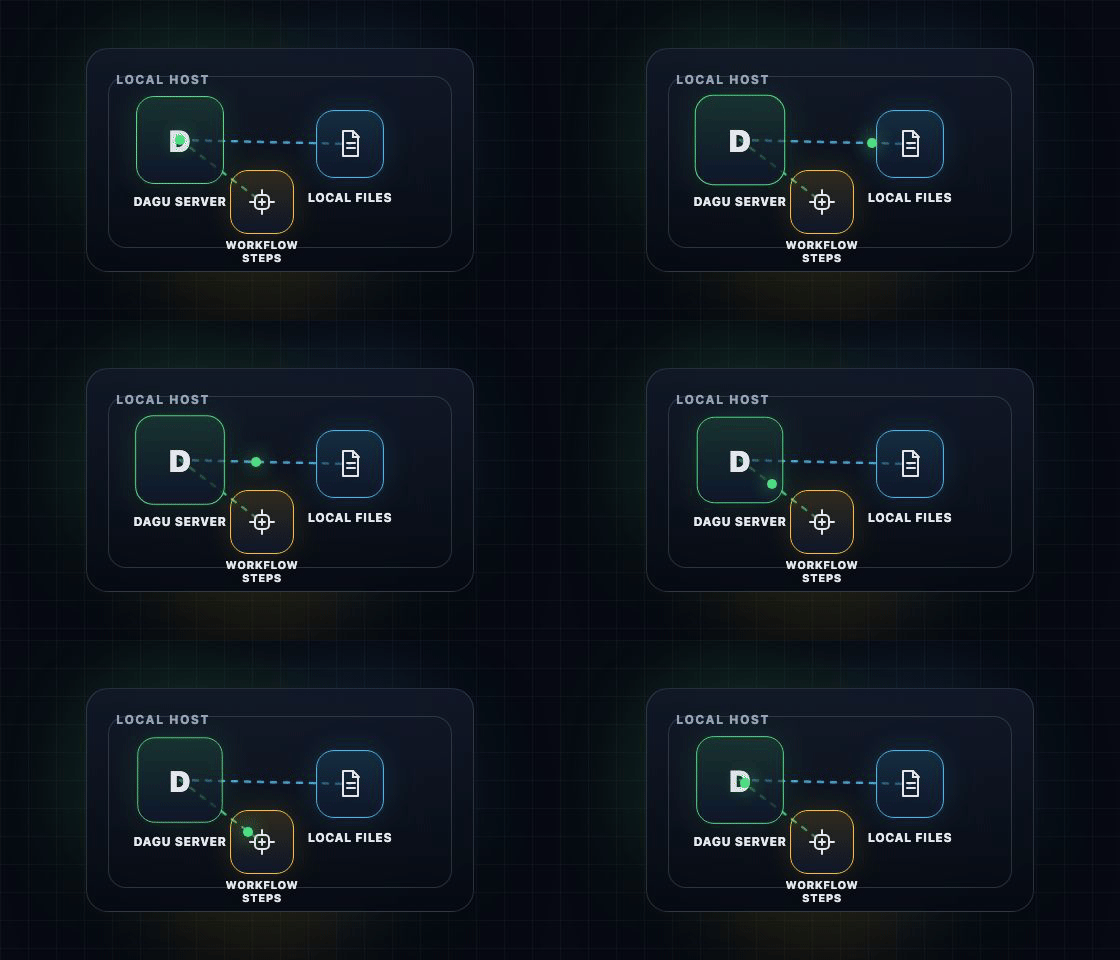
लोकल
`dagu start-all` को एक machine पर local file-backed state के साथ चलाएं। Database, broker या platform stack की जरूरत नहीं।
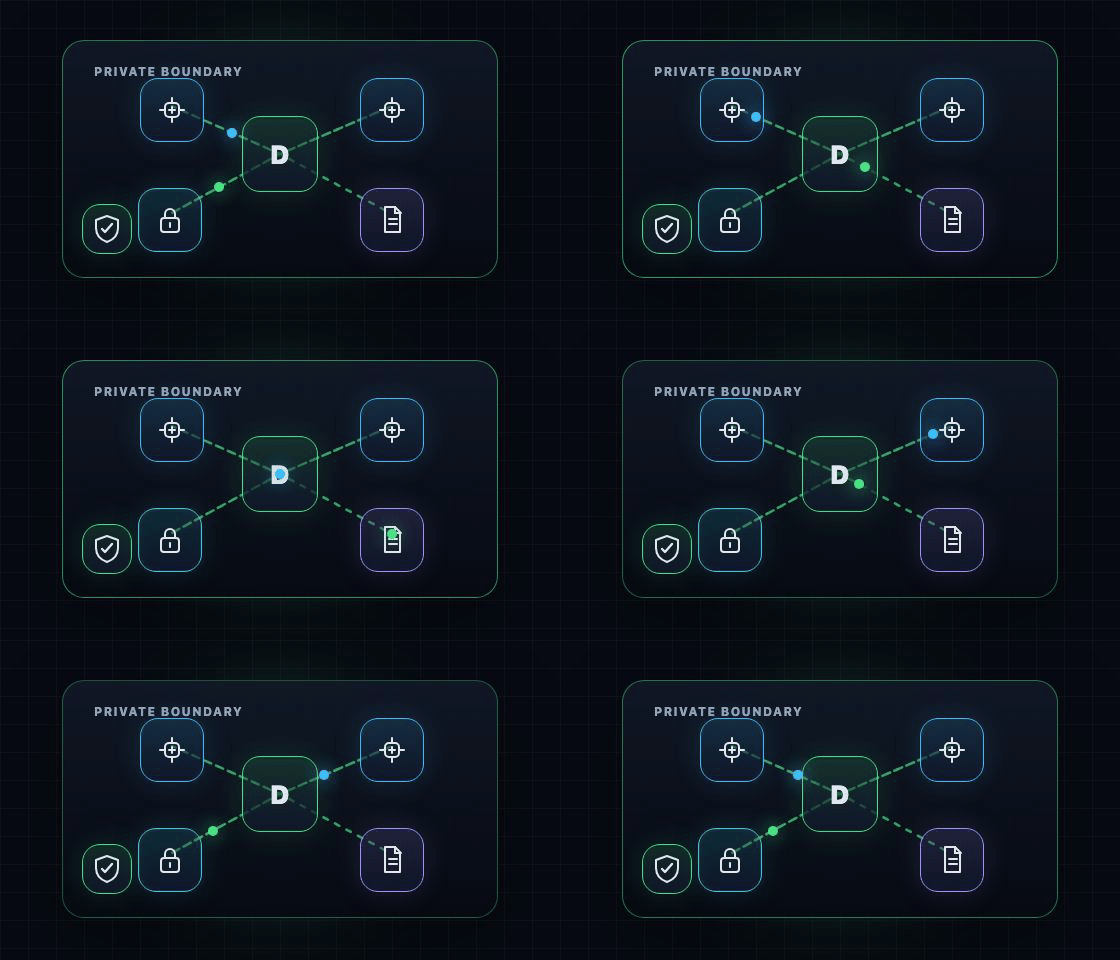
सेल्फ-होस्टेड
Dagu server, workers, secrets, logs और execution को अपने environment में रखें।
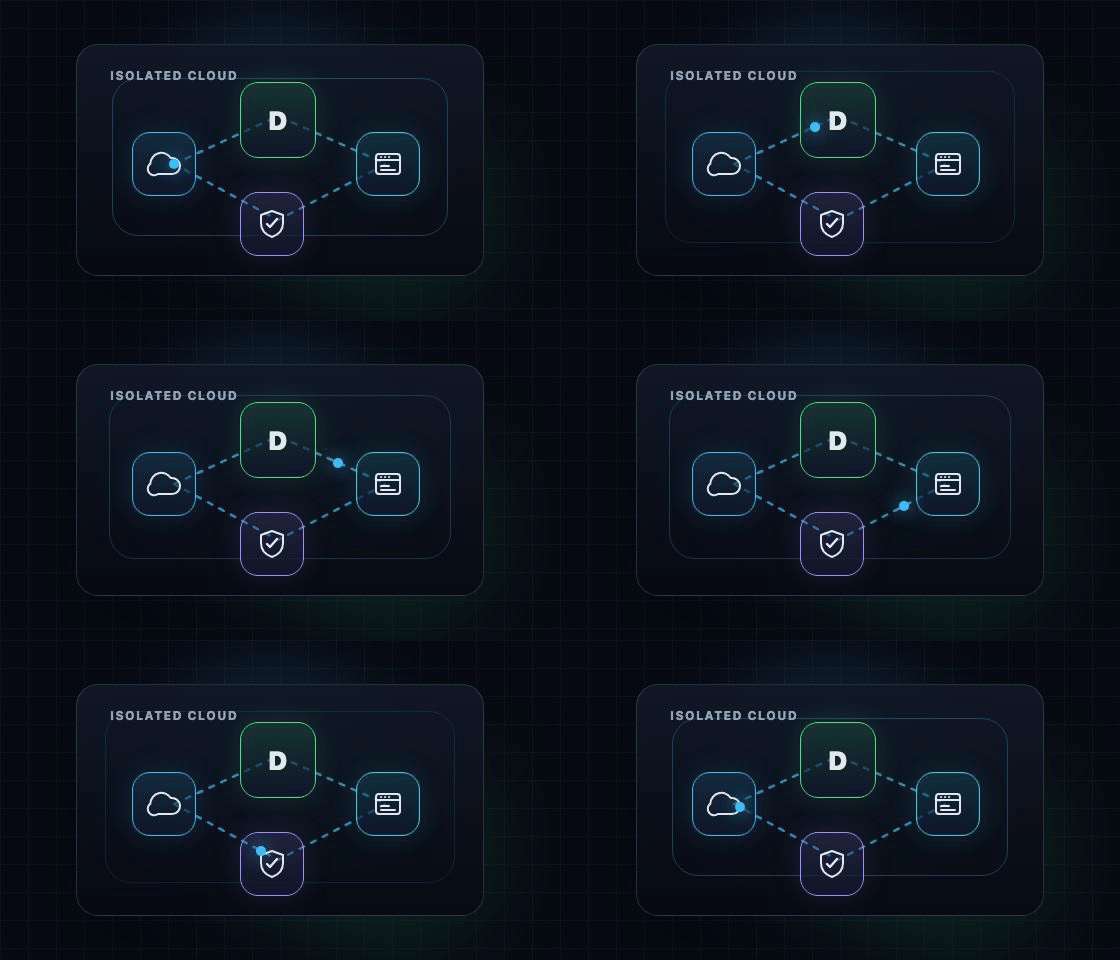
Dagu
Dagu द्वारा GKE पर isolated gVisor instance में operated dedicated Dagu server इस्तेमाल करें।
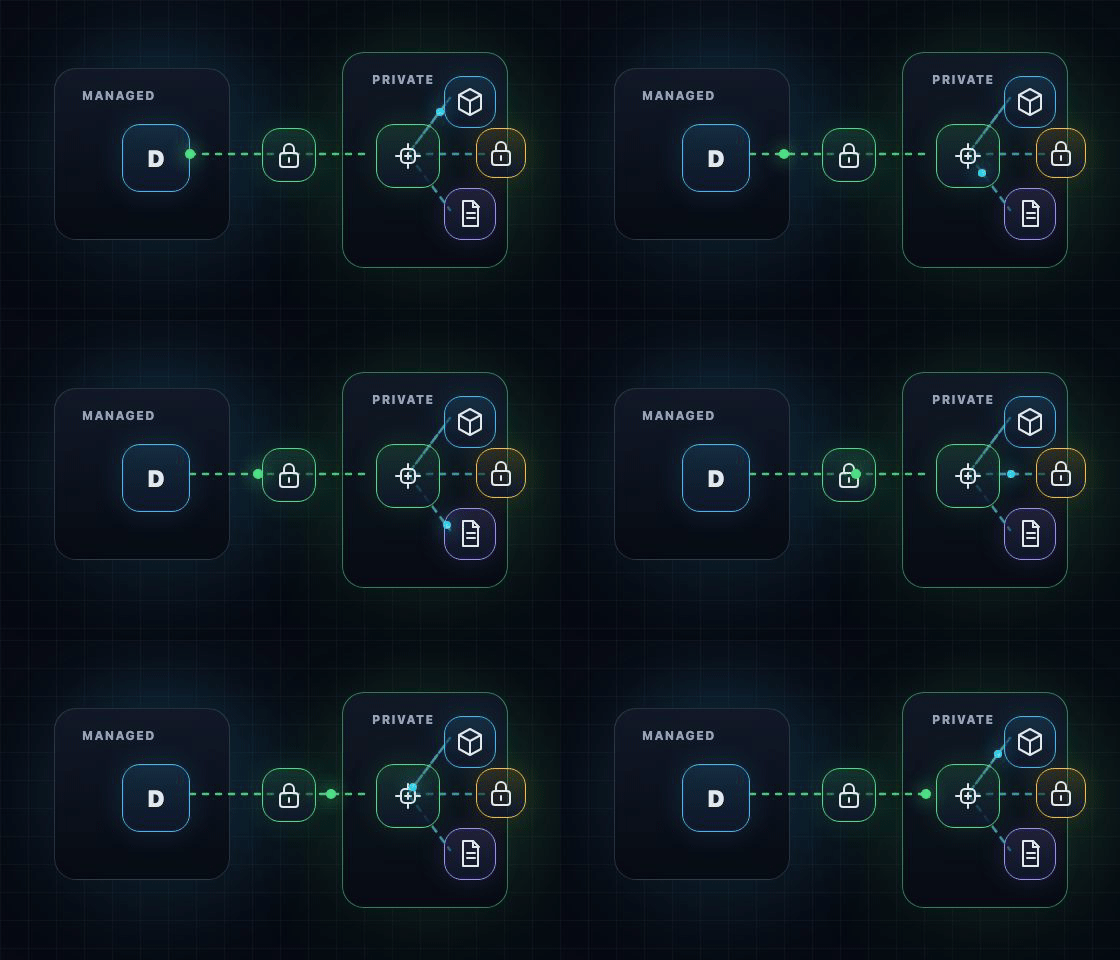
हाइब्रिड
Dagu server operate करे, और private workers Docker, private-network या data-local steps चलाएं।
हाइब्रिड execution
Hybrid Dagu server को managed रखता है, जबकि जिस execution को आपकी network, runtime या data चाहिए वह आपके control में रहती है।
Battle-tested workflow engine features आपको orchestration की चिंता किए बिना core value पर focus करने देती हैं।
Hardware, workflow के आकार, step duration और queue settings के आधार पर एक machine पर हर दिन हज़ारों workflow runs चलाए जा सकते हैं।
Load को काबू में रखने और jobs को अलग-अलग machines में बाँटने के लिए queues, concurrency limits और distributed workers का इस्तेमाल करें।
Recurring schedules, catchup, durable executions, timeouts, reruns, notification, और incidents का responders तक routing।
User management, RBAC, workspaces, approval steps, built-in secret management, API Keys, और webhooks।
Repetitive engineering requests को self-service workflows में बदलें। Business teams उन्हें independently run करती हैं। Engineers loop से बाहर रहते हैं।
Existing shell scripts, Python scripts, HTTP calls और scheduled jobs को rewrite किए बिना Dagu में लाएं.
SSH backups, cleanup jobs, deploy scripts, patch windows, precondition checks और lifecycle hooks को एक साथ समन्वित करें।
PostgreSQL या SQLite queries, S3 transfers, jq transforms, validation steps और reusable sub-workflows चलाएँ।
Managed Dagu GitHub App के माध्यम से issues और PRs के GitHub events से Dagu runs trigger करें।
ऐसे workflows बनाएँ जिनमें हर step Docker image, Kubernetes Job, shell command या validation step चला सके।
ffmpeg, thumbnail extraction, audio normalization, image processing और दूसरे भारी compute jobs को workers पर चलाएँ।
छोटे devices पर sensor polling, local cleanup, offline sync, health checks और maintenance jobs चलाएँ।
Clean context और automatic retry व failover के साथ specific development workflow को automate करने के लिए कोई भी harness run करें।
Private scripts, internal CLIs, reusable actions, pinned tools और artifacts को ऐसे workflows बनाएं जिन्हें दूसरी teams safely request या run कर सकें.
tools:
  - jqlang/jq@jq-1.7.1

steps:
  - id: collect
    action: acme/dagu-action-export@v1.4.2
    with:
      dataset: customers

  - id: transform
    run: jq '.items[] | {id, email}' ${collect.outputs.path}
    stdout:
      artifact: reports/customers.json
    depends: [collect]

  - id: publish
    action: outputs.write
    with:
      values:
        report: reports/customers.json
        rows: ${collect.outputs.rows}
    depends: [transform]
Dagu उन्हें Web UI में automatically typed parameter input form के रूप में render करता है, जो self-service workflows बनाने या non-engineers द्वारा operation के लिए उपयोगी है।
tools:
  - jqlang/jq@jq-1.7.1

steps:
  - id: inspect
    run: jq --version

  - id: summarize
    action: python-script@v1
    with:
      input:
        rows: [42, 8]
      script: |
        return {"total": sum(input["rows"])}
Tools तैयार करने के लिए Dagu default provider के रूप में aqua का उपयोग करता है।
YAML में CLI tools और versions declare करें। Dagu host-command steps से पहले उन्हें तैयार करता है।
और जानेंPython या NodeJS जैसे official Dagu Actions का उपयोग करें, या अपने workflow को आवश्यक tools और dependencies के साथ run करने के लिए अपना खुद का action package बनाएं।
और जानेंDAG runs में artifacts manage करें और Web UI में preview / download करें।
और जानेंहर workflow के लिए notifications configure करें ताकि जरूरी events सही channel तक पहुंचें।
और जानेंSlack में AI agent आपके workflows manage करने,
failures debug करने और incidents recover करने में मदद करता है।
 Dagu
DaguDagu production-grade workflow engine features से लैस है।
Dagu GitHub समुदाय की वास्तविक टिप्पणियाँ।
This is literally my dream project. I have set up GitLab at some point just to run some commands and this project is perfect for all my use case. Thank you very much!
@vnghia
Developer
Dagu is really a gem in the open source world! ❤️ What a release — with GitHub Actions as well. Thanks guys.
@borestad
Elk Studios
Dagu is an amazing tool!! It works perfectly now, thank you so much! 💖
@jarnik
Freelance developer
I've been exploring Dagu for a few weeks and really love the Zero-Ops philosophy. The declarative YAML approach is exactly what the workflow orchestration space needs.
@vincent067
Developer
Amazing! I did not expect this to be delivered that fast! Multiple schedulers do not compete and the locking mechanism works as expected. Good job!
@jonasban
Developer
I've recently played around with Dagu for private stuff and think it could also be worth introducing at work.
@DarkWiiPlayer
Developer
Awesome, it works like a charm! I second the update of the doc on this one.
@thibmart1
Developer
That's very impressive. The exit code dictionary will make these DAGs even further sophisticated. Once again, very good features. 🫡
@ghansham
Developer
This is literally my dream project. I have set up GitLab at some point just to run some commands and this project is perfect for all my use case. Thank you very much!
@vnghia
Developer
Dagu is really a gem in the open source world! ❤️ What a release — with GitHub Actions as well. Thanks guys.
@borestad
Elk Studios
Dagu is an amazing tool!! It works perfectly now, thank you so much! 💖
@jarnik
Freelance developer
I've been exploring Dagu for a few weeks and really love the Zero-Ops philosophy. The declarative YAML approach is exactly what the workflow orchestration space needs.
@vincent067
Developer
Amazing! I did not expect this to be delivered that fast! Multiple schedulers do not compete and the locking mechanism works as expected. Good job!
@jonasban
Developer
I've recently played around with Dagu for private stuff and think it could also be worth introducing at work.
@DarkWiiPlayer
Developer
Awesome, it works like a charm! I second the update of the doc on this one.
@thibmart1
Developer
That's very impressive. The exit code dictionary will make these DAGs even further sophisticated. Once again, very good features. 🫡
@ghansham
Developer
This is literally my dream project. I have set up GitLab at some point just to run some commands and this project is perfect for all my use case. Thank you very much!
@vnghia
Developer
Dagu is really a gem in the open source world! ❤️ What a release — with GitHub Actions as well. Thanks guys.
@borestad
Elk Studios
Dagu is an amazing tool!! It works perfectly now, thank you so much! 💖
@jarnik
Freelance developer
I've been exploring Dagu for a few weeks and really love the Zero-Ops philosophy. The declarative YAML approach is exactly what the workflow orchestration space needs.
@vincent067
Developer
Amazing! I did not expect this to be delivered that fast! Multiple schedulers do not compete and the locking mechanism works as expected. Good job!
@jonasban
Developer
I've recently played around with Dagu for private stuff and think it could also be worth introducing at work.
@DarkWiiPlayer
Developer
Awesome, it works like a charm! I second the update of the doc on this one.
@thibmart1
Developer
That's very impressive. The exit code dictionary will make these DAGs even further sophisticated. Once again, very good features. 🫡
@ghansham
Developer
I love how simple this is now.
@n3storm
Estudio Nexos
Fantastic! Thanks for the quick reply — keep up the great project!
@mitchplze
Developer
Amazing support! Thank you!
@kacamific
Developer
It works perfectly with v2.6.1. Thank you very much for the correction.
@napnap75
Developer
Thanks for the fix. Works great now.
@triole
Developer
As always, appreciate the great work — just sharing feedback to help shape the roadmap.
@jonnochoo
Developer
it's awesome you keep working on it 👍
@fishnux
Developer
Thank you so much for the quick fix! I tested it, and it now correctly stores the files where it should.
@IngwiePhoenix
Developer
I love how simple this is now.
@n3storm
Estudio Nexos
Fantastic! Thanks for the quick reply — keep up the great project!
@mitchplze
Developer
Amazing support! Thank you!
@kacamific
Developer
It works perfectly with v2.6.1. Thank you very much for the correction.
@napnap75
Developer
Thanks for the fix. Works great now.
@triole
Developer
As always, appreciate the great work — just sharing feedback to help shape the roadmap.
@jonnochoo
Developer
it's awesome you keep working on it 👍
@fishnux
Developer
Thank you so much for the quick fix! I tested it, and it now correctly stores the files where it should.
@IngwiePhoenix
Developer
I love how simple this is now.
@n3storm
Estudio Nexos
Fantastic! Thanks for the quick reply — keep up the great project!
@mitchplze
Developer
Amazing support! Thank you!
@kacamific
Developer
It works perfectly with v2.6.1. Thank you very much for the correction.
@napnap75
Developer
Thanks for the fix. Works great now.
@triole
Developer
As always, appreciate the great work — just sharing feedback to help shape the roadmap.
@jonnochoo
Developer
it's awesome you keep working on it 👍
@fishnux
Developer
Thank you so much for the quick fix! I tested it, and it now correctly stores the files where it should.
@IngwiePhoenix
Developer
गाइडेड विज़ार्ड से Dagu इंस्टॉल करें, फिर पूरी installation guide या quickstart docs में आगे बढ़ें।
स्क्रिप्ट इंस्टॉलर सबसे आसान और सुझाया गया तरीका है। Homebrew, npm और Docker भी उपलब्ध हैं, लेकिन वे केवल बाइनरी या कंटेनर इंस्टॉल करते हैं।
Workflow authoring के लिए Dagu skill इंस्टॉल करें, या चल रहे Dagu server से MCP client कनेक्ट करें।
Claude Code, Codex, Gemini CLI और अन्य AI coding tools को Dagu YAML लिखने में मदद करता है।
MCP-capable clients को Dagu state पढ़ने, changes preview करने और DAG runs control करने देता है।
OIDC/SSO-backed MCP access enterprise deployments के लिए उपलब्ध है। setup पर चर्चा करने के लिए हमसे संपर्क करें।
गाइडेड इंस्टॉलर आपके लिए पहली बार की सेटअप पूरी कर सकता है।
Usage पर चर्चा करें, issues रिपोर्ट करें, और development follow करें।
Solution partner
जो teams Dagu को customer-facing products, internal platforms या managed services में embed करती हैं, उनके लिए हम enterprise features और hands-on integration support देते हैं.
हम partners को security model, integration path और operating plan design करने में मदद करते हैं ताकि Dagu customer projects में साफ तरीके से fit हो और broad production access देने की जरूरत न पड़े.