हर server का अलग web UI
हर server सिर्फ अपने runs दिखाता है। पाँच servers पर पिछली रात की failures देखने के लिए पाँच web UI खोलने पड़ते हैं।
Dagu console · Beta
अपने self-hosted Dagu servers को Dagu console से connect करें। उनकी health, runs और trends pages के एक ही set पर दिखते हैं, और कोई workflow fail होने या कोई server report भेजना बंद करने पर आपको email मिलता है। Workflows सिर्फ आपके servers पर ही चलते रहते हैं।
एक server के लिए free। Team और Pro हर licensed server को cover करते हैं। Dagu v2.19.1 या उसके बाद का version ज़रूरी है; free monitoring के लिए v2.19.2 या उसके बाद का।
आपके servers
Workflows यहाँ चलते हैं
Workflow fail होने या server के report भेजना बंद करने पर, और फिर recover होने पर email
हर Dagu server अपने आप में पूरा है, अपने scheduler, run history और web UI के साथ। कई servers होने का मतलब जाँचने की भी कई जगहें है।
हर server सिर्फ अपने runs दिखाता है। पाँच servers पर पिछली रात की failures देखने के लिए पाँच web UI खोलने पड़ते हैं।
कोई भी चीज़ सभी servers की failures को एक जगह इकट्ठा नहीं करती, इसलिए पूरी तस्वीर किसी को नहीं दिखती।
रुका हुआ scheduler या चुप हो गया server कोई error नहीं देता। Scheduled workflows बस चलना बंद कर देते हैं, जब तक किसी का ध्यान न जाए।
Failure emails के लिए हर server पर mail और notification settings चाहिए, जिन्हें हाथ से एक जैसा रखना पड़ता है।
Dagu console के Monitoring section में Overview, Servers, Runs, Alerts और Insights pages हैं, साथ ही हर server और हर workflow का अपना page। Workspace का हर member इन्हें देख सकता है।
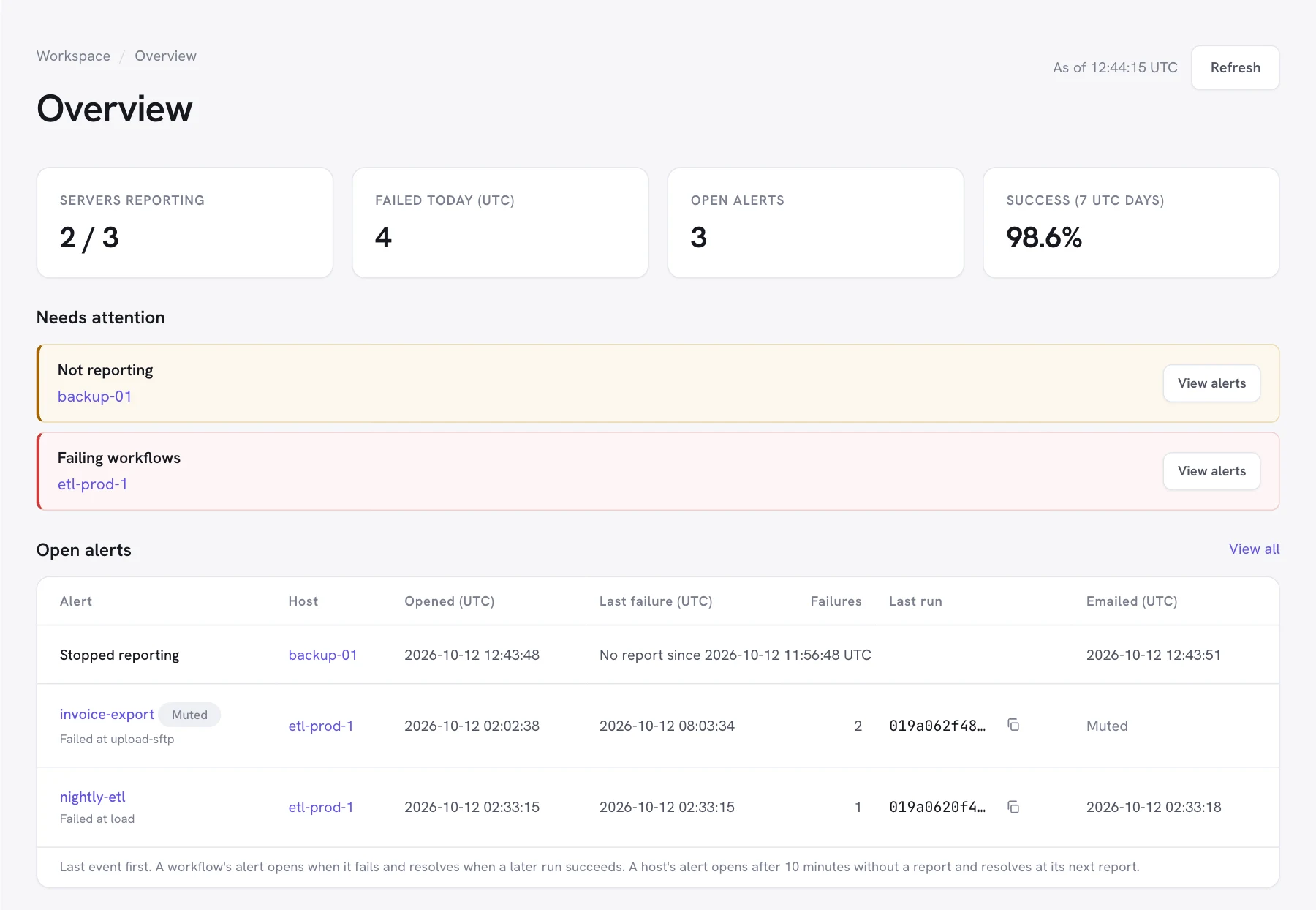
Report भेज रहे servers, आज की failures (UTC), खुले alerts, और पिछले 7 UTC दिनों का success rate। Needs attention हर समस्या को उससे प्रभावित servers के साथ दिखाता है।
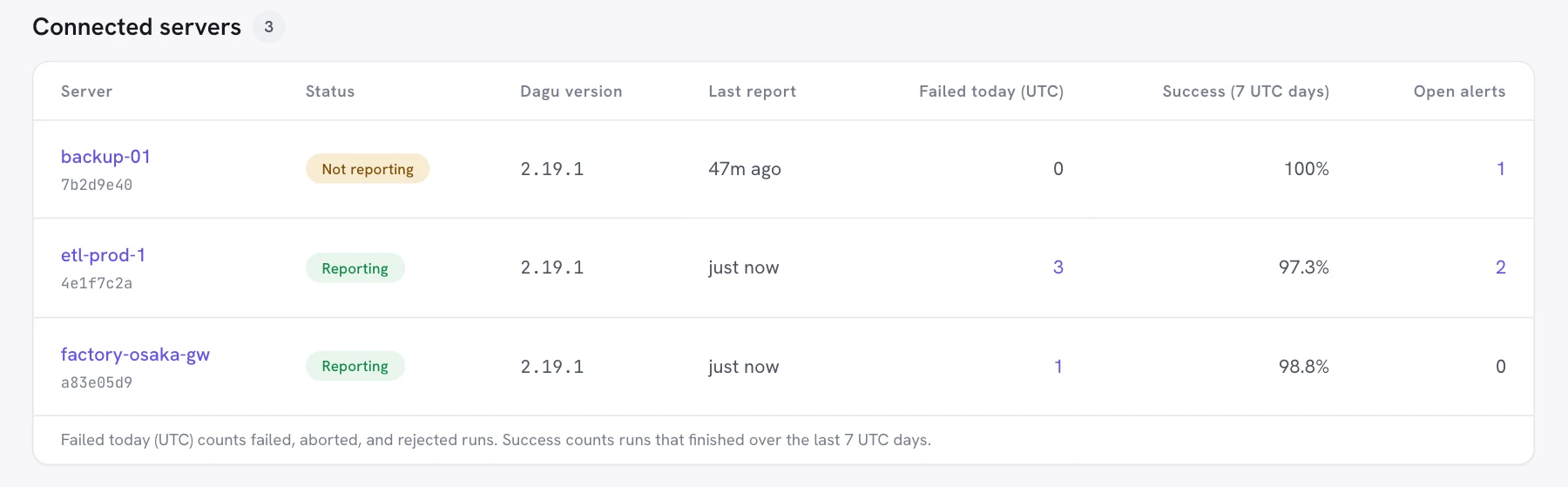
हर connected server, उसके status, Dagu version, आखिरी report, आज की failures (UTC), 7 UTC दिनों के success rate और खुले alerts के साथ।
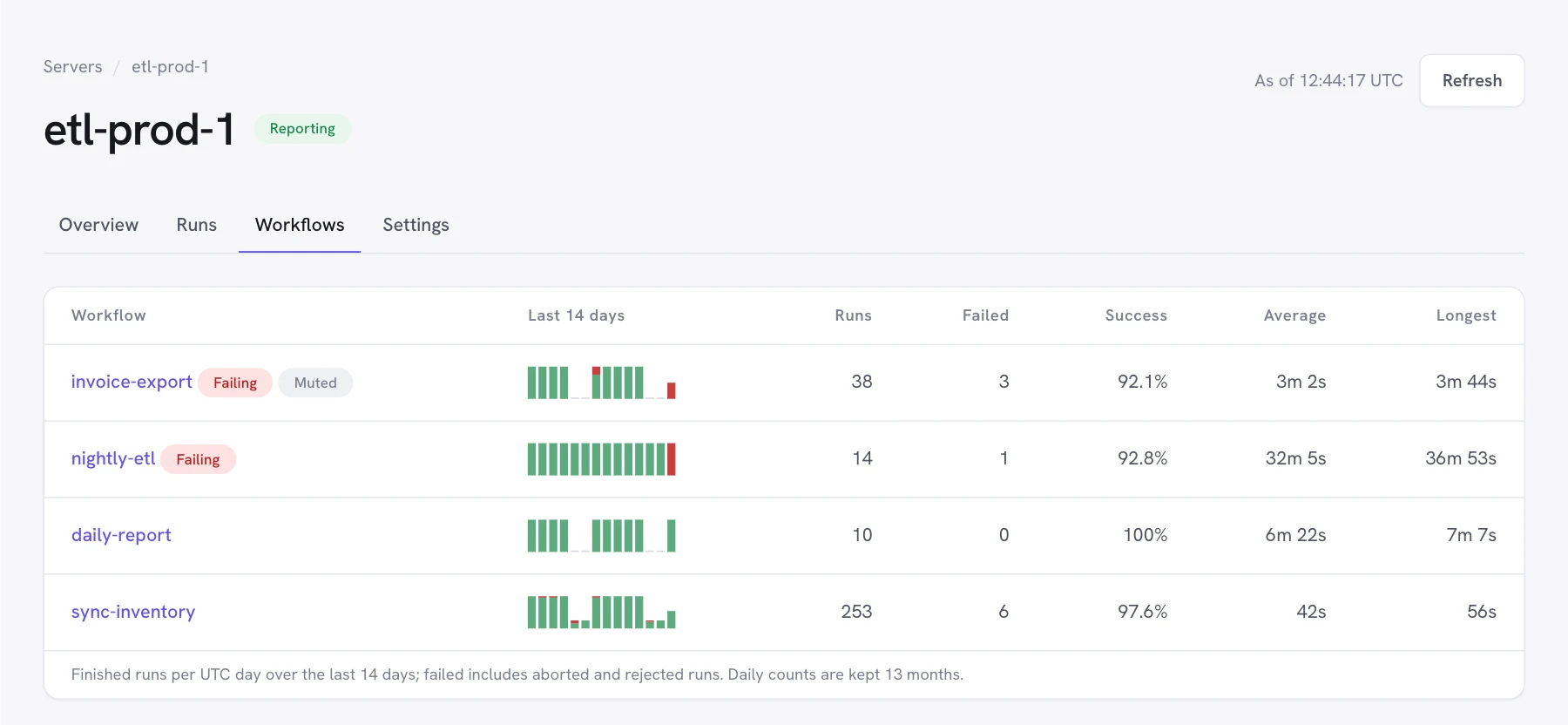
हर server का एक page। Overview उसकी health (Dagu version, OS और architecture, process शुरू होने का समय, आखिरी report, आखिरी check-in), आखिरी report की services, खुले alerts और पिछले 14 दिनों की failures दिखाता है। Runs उसके runs की सूची देता है। Workflows हर workflow के finished runs को 14 दिनों तक हर UTC दिन के हिसाब से दिखाता है, साथ में runs, failures, success rate, और औसत व सबसे लंबी duration।
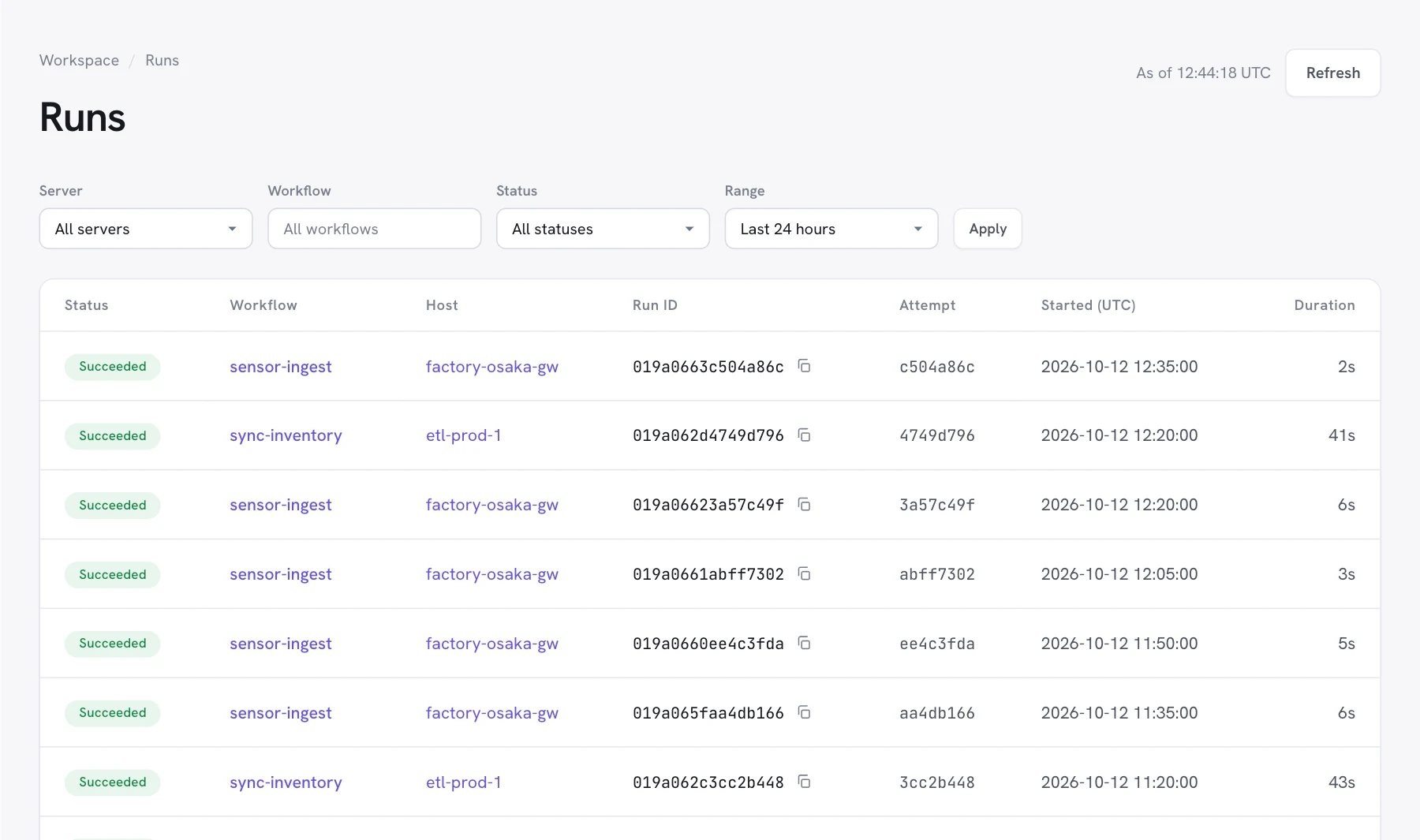
चल रहे runs पहले आते हैं, फिर finished runs, सबसे नए पहले। हर run का उसके attempts तक एक permalink होता है।
Server, workflow, status (failed, succeeded, running, waiting या queued) और range से filter करें: पिछला घंटा, 24 घंटे, 7 दिन या 14 दिन।
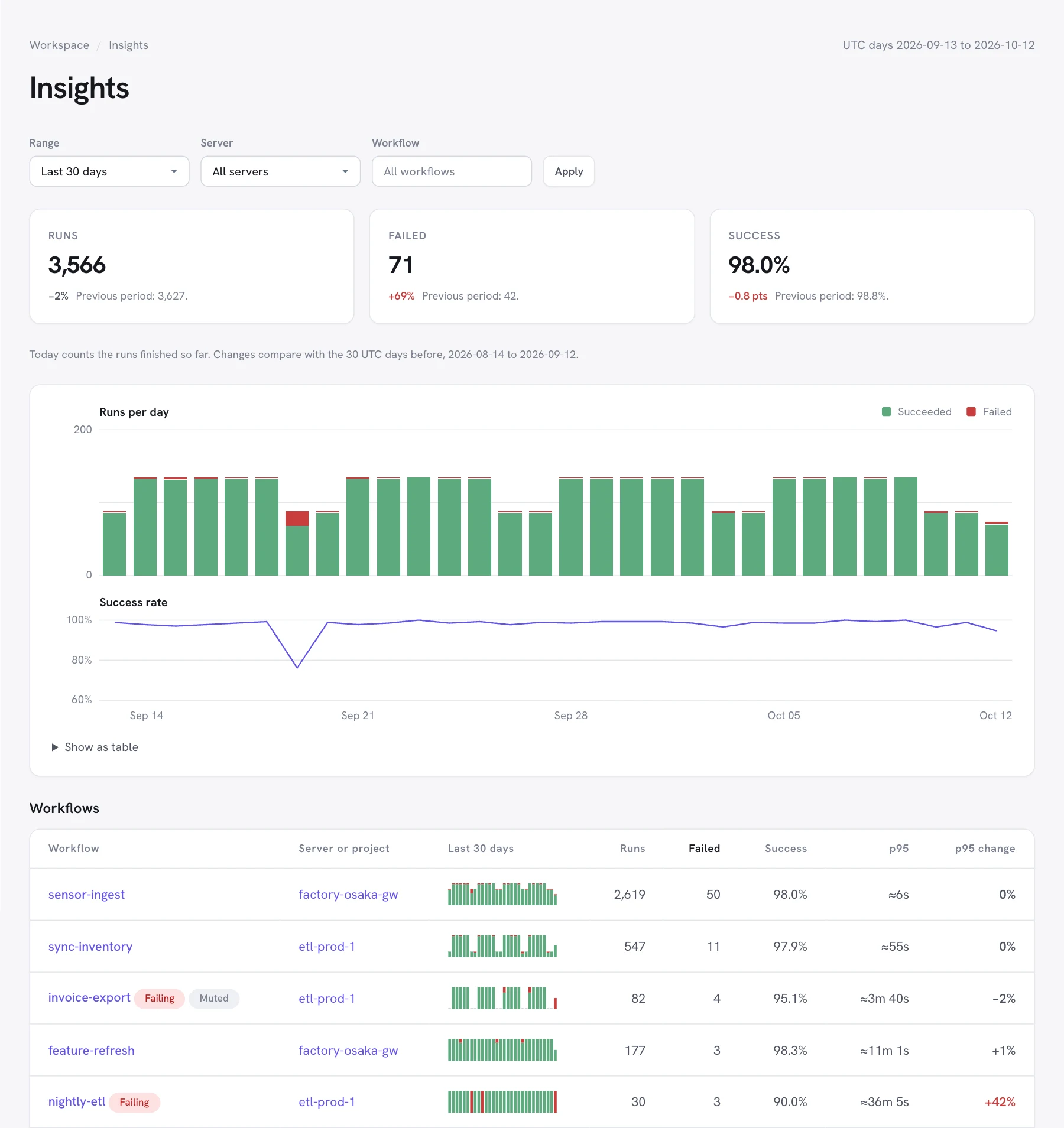
पिछली अवधि की तुलना में runs, failures और success rate, हर दिन के runs, और हर workflow की p95 duration व उसमें आया बदलाव। आज के runs खत्म होते ही गिने जाते हैं।
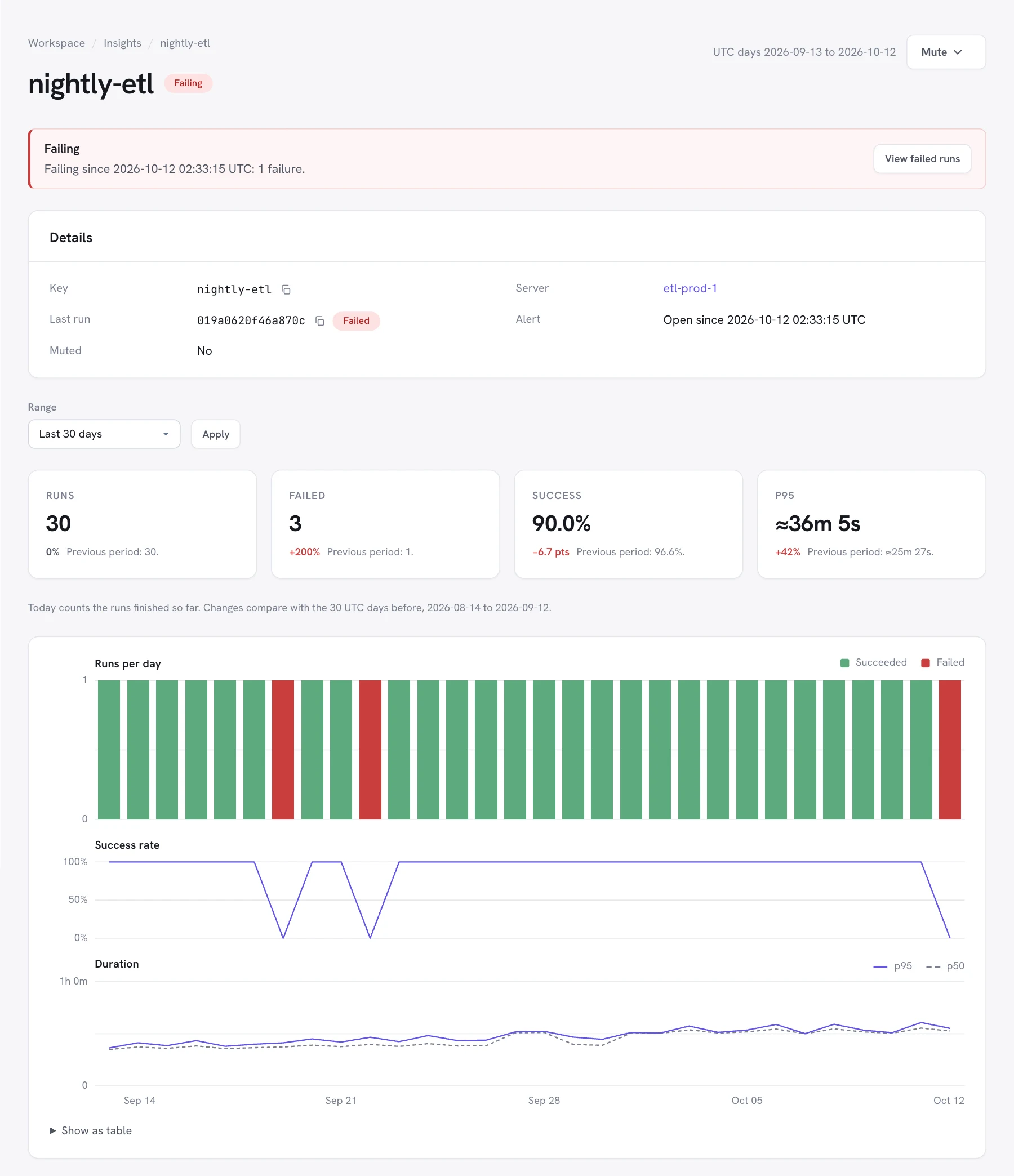
हर workflow का एक page, जिसमें उसका खुला alert, हर दिन के runs, success rate, और 7, 30 या 90 दिनों की p50 और p95 duration है, साथ में उसके हाल के runs और वे steps जिन पर वह fail हुआ। Owners उसे यहीं से mute कर सकते हैं।
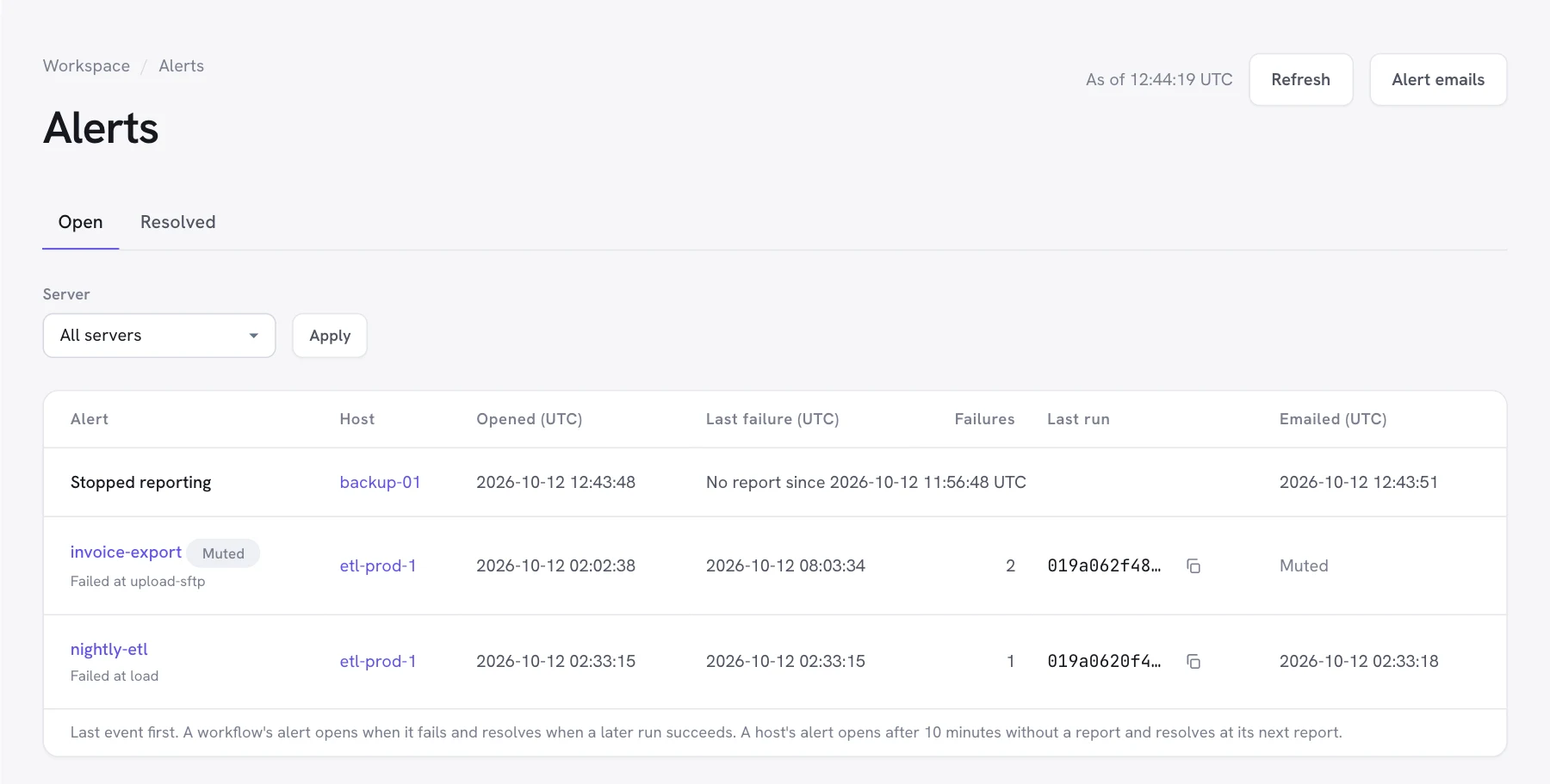
एक alert एक server पर एक workflow का होता है। Run fail होने पर यह खुलता है, बाद की failures गिनता है, और workflow के फिर से सफल होने पर resolve हो जाता है।
Workflow alerts के लिए Health and run status level चाहिए। Emails no-reply@dagu.sh से आते हैं।
आपके servers Dagu console को reports भेजते हैं। Dagu console कभी उनसे connect नहीं करता और कभी workflows नहीं चलाता।
Reports, server से console.dagu.sh को जाने वाले HTTPS requests हैं। कोई inbound port नहीं खोला जाता, और बाहर से कुछ भी server से connect नहीं होता।
अगर Dagu console तक पहुँचा न जा सके, तो workflows हमेशा की तरह चलते हैं। Server retry करता है और console वापस आते ही छूटे हुए runs भेज देता है।
Monitoring default रूप से बंद रहता है, और हर server के लिए उसका administrator इसे चुनता है। Server को connect या upgrade करने पर उसके license check-in के अलावा कुछ नहीं भेजा जाता।
Health only यह भेजता है कि server क्या चला रहा है। Health and run status उसके runs का status भी जोड़ता है, और workflow alerts के लिए ज़रूरी है।
Dagu version, OS और architecture, और server process कब शुरू हुआ
चल रहे schedulers और registered coordinators की संख्या
हर finished top-level run: DAG name, run ID, attempt ID, status, trigger, और वह कब queue हुआ, शुरू हुआ और खत्म हुआ
किसी run के failed steps के नाम, 50 तक
Queued, running या waiting runs, हर report में 200 तक
Logs, outputs, parameters, environment, step commands, DAG YAML, secret values और error messages
हर report में server का license ID, server ID और heartbeat secret भी जाता है, जैसा उसके license check-in में भी होता है। DAG और step names सिर्फ run status के साथ भेजे जाते हैं; अगर आप इन्हें संवेदनशील मानते हैं तो Health only चुनें।
Dagu v2.19.1 या उसके बाद का version ज़रूरी है (free monitoring के लिए v2.19.2 या उसके बाद का), और server को HTTPS पर https://console.dagu.sh तक पहुँचना चाहिए।
Dagu में Plan & features खोलें और Connect to Dagu Console चुनें, dagu license activate चलाएँ, या server को server key के साथ start करें। Offline licenses वाले servers report नहीं भेजते।
Plan & features के Monitoring section में Turn on चुनें, फिर Health and run status या Health only चुनें। यह चुनाव restart के बिना तुरंत लागू होता है।
Code के रूप में manage किए जाने वाले servers के लिए, configuration file में level सेट करें, या DAGU_CLOUD_REPORT=runs सेट करें:
cloud:
  report: runs   # off, health, or runs
Server हर 60 सेकंड में report भेजता है, और जब कोई run fail होता है या चल रहे runs बदलते हैं, तो लगभग 5 सेकंड के भीतर। यह Dagu console में Monitoring के अंतर्गत दिखता है।
Monitoring अभी Beta में है। Beta के दौरान retention periods और limits बदल सकते हैं।
हर workspace में एक server के लिए free, कम limits के साथ: हर 5 मिनट में एक report, प्रति दिन 100 stored runs, 7 दिन की run history, और owners व admins को alerts। Team और Pro हर licensed server को cover करते हैं।
प्लान की तुलना करेंजो server 30 दिनों तक कोई report नहीं भेजता, उसे उसके daily totals और alerts के साथ monitoring से हटा दिया जाता है।
हर workspace प्रति UTC दिन 500 finished runs तक store करता है, free monitoring पर 100 तक। Limit से ज़्यादा runs भी daily totals में गिने जाते हैं और alerts खोलते व resolve करते हैं, लेकिन उन्हें run list में नहीं जोड़ा जाता। Store करना 00:00 UTC पर फिर से शुरू होता है।
और चाहिए? हमसे संपर्क करेंSetup guide पढ़ें, या Dagu console खोलें और अपना पहला server connect करें।