Product
Kitewell beta: Dagu as a desktop app, with an AI assistant
Kitewell, a macOS and Windows app built on Dagu, is in beta. Describe a job to its AI assistant, check the workflow on a visual map, and your computer runs it with the Dagu engine inside. It is free for one project.
TL;DR Kitewell, a desktop app built on Dagu by the makers of Dagu, is in beta for macOS and Windows. Describe a job to its AI assistant, check the workflow it proposes on a visual map, and your computer runs it with the Dagu engine bundled inside. It is free for one project with up to 10 workflows. Download Kitewell.
Dagu is built for people who are at home in a terminal: one binary, workflows in YAML, kept in git and reviewed like code. That is what Dagu is, and it is not changing.
A lot of the work worth automating belongs to people who will never install a server, though. The month-end export someone in finance does by hand. The report copied out of a vendor portal every Monday. The nightly chores on an engineer's own laptop that are not worth a server of their own. Those people need the same engine behind a different front door. Kitewell is that door.
What Kitewell adds
- An assistant that builds workflows. Describe the job in plain words. The assistant reads what the project already has, proposes the workflow step by step, and waits for you to apply it. When a run fails, ask it why: it reads the run and proposes a fix.
- A visual editor, with the YAML. Steps sit on a workflow map you can edit directly. The YAML is one click away, and every workflow is a Dagu workflow.
- Websites and desktop apps. AI drives a browser or a desktop app the way a person would. When a screen changes, it relearns the step instead of failing on a missing element.
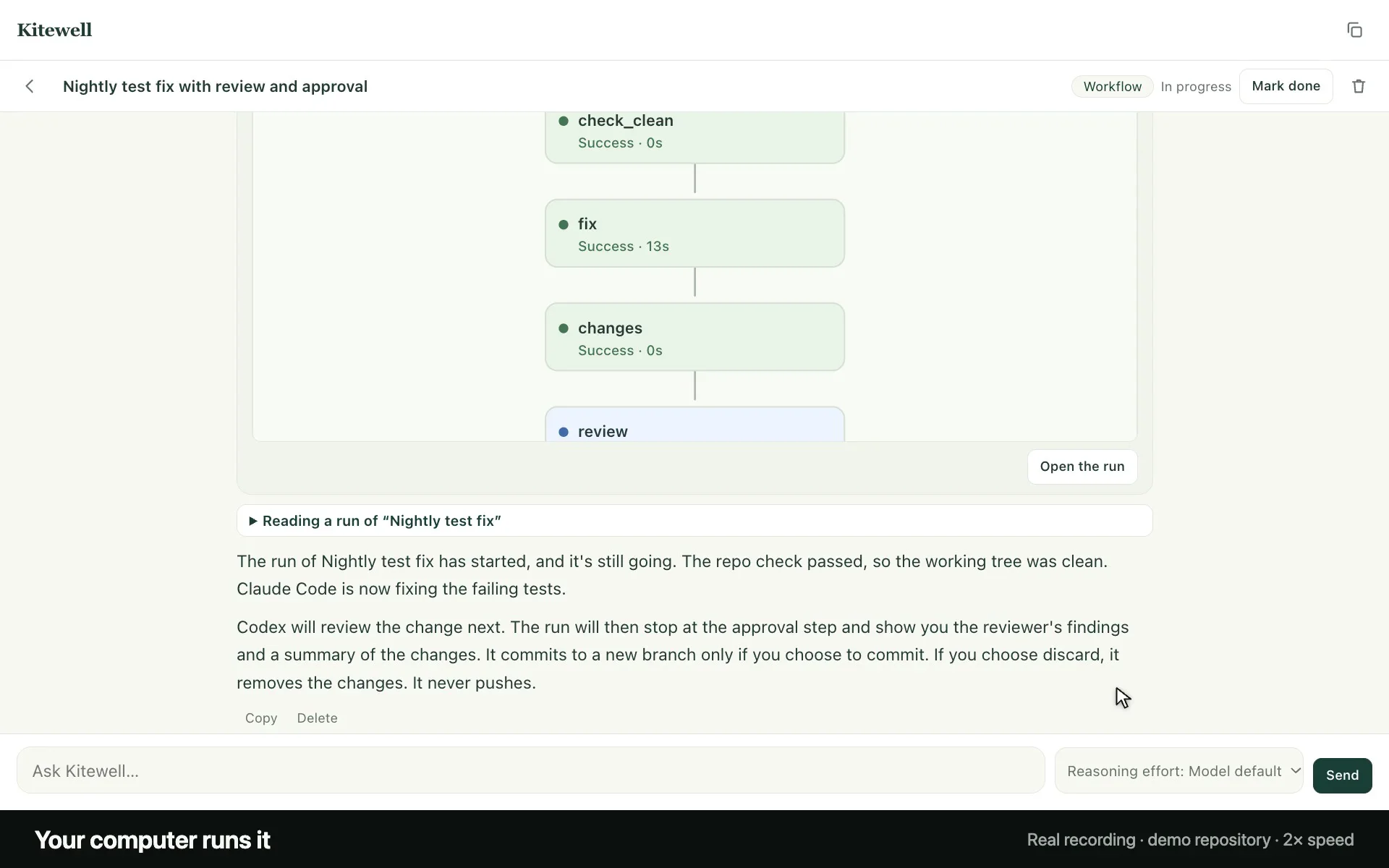
- Coding agents as steps. Claude Code, Codex, Gemini CLI, and other agent CLIs run as workflow steps on the sign-ins you already have. Chain them, have one review another, and pause for your approval before anything is committed.
- Nothing to set up. One installer. The Dagu engine is bundled, so there is no server, no CLI, and no service to keep running.
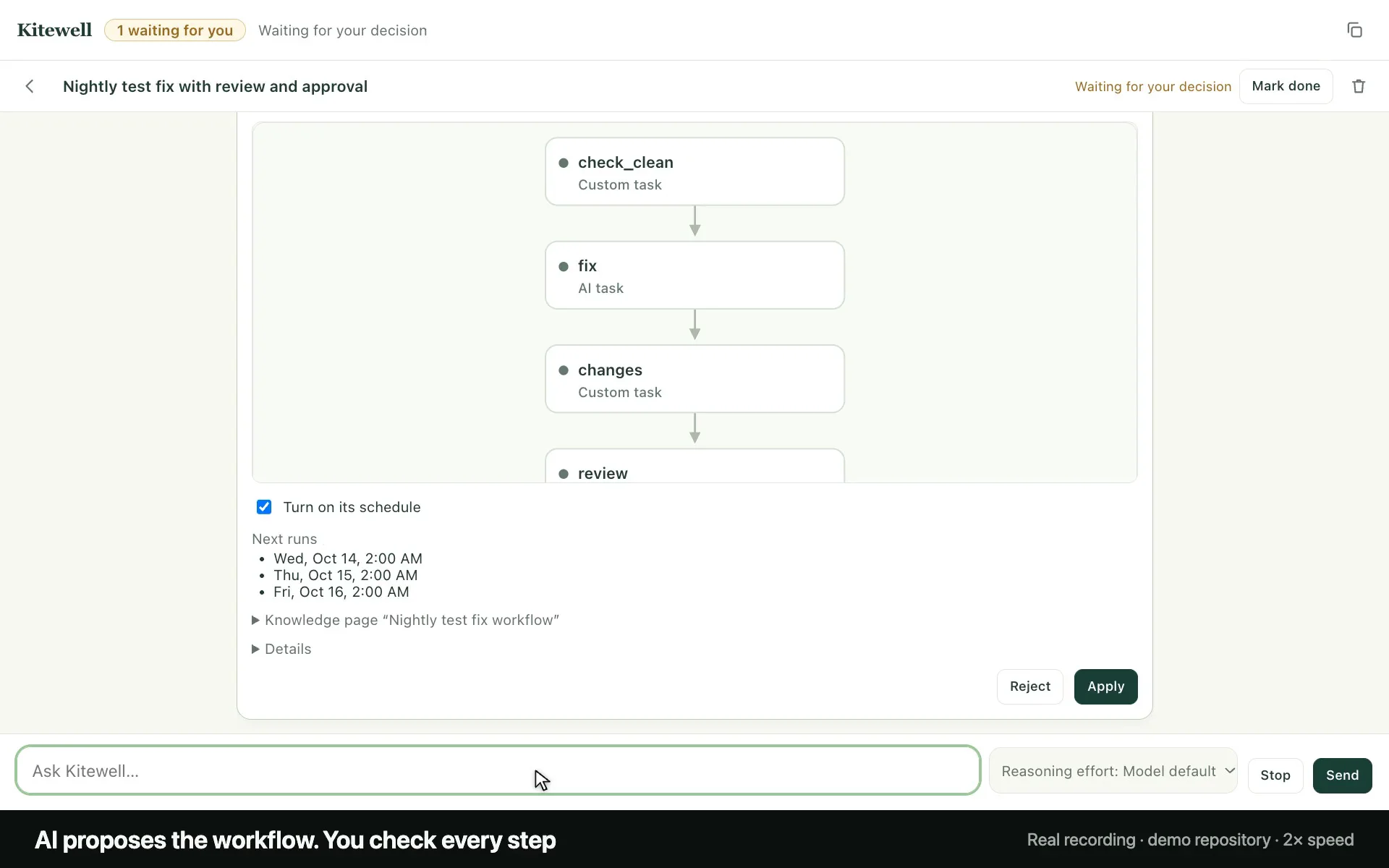
These screens come from a real recording, which plays on kitewell.app. It took one request: "Every night at 2 AM, have Claude Code fix the failing tests in ~/code/invoice-tools, then have Codex review the change. Get my approval before committing the fix to a new branch. Never push." The assistant proposed the workflow, scheduled it, and ran it.
How it relates to Dagu
- Same engine. Kitewell runs workflows with the Dagu engine it bundles, so steps, schedules, retries, logs, and approvals behave as they do in Dagu.
- Same console. Kitewell's runs show up in Dagu Console, the console that monitors Dagu servers, with an email when a run fails or the computer goes quiet.
- Dagu does not change. Dagu stays open source, and the Dagu server, its web UI, and its YAML work as before. If you run Dagu on a server, nothing changes for you. Kitewell is for the people around you who would rather have an app.
Plans
Kitewell is free for one person's own work: one project with up to 10 workflows on one computer, and no account needed. Personal adds more projects, alerts, and webhooks; Team adds the people you share projects with. The details are at kitewell.app/pricing.
Try it
- Download Kitewell for macOS 13 or later, on Apple silicon or Intel, or for Windows. Linux is planned.
- Open it and tell the assistant about a job you do by hand.
- Check the workflow it proposes, apply it, and run it.
Kitewell is in beta. If something breaks, or a step you need is missing, tell us at kitewell.app/support.
Written by
Contributor to the Dagu project.
More from Yota Hamada