Product
Start Dagu workflows from GitHub, Stripe, and Slack, wherever Dagu runs
Dagu v2.20 gives a DAG's webhook a public URL through Dagu Cloud, so GitHub, Stripe, or Slack can start it on a server with no public address. Requests wait while the server is offline.
TL;DR Dagu v2.20 can give a DAG's webhook a public URL through Dagu Cloud. GitHub, Stripe, Slack, or any Standard Webhooks sender can then start the DAG on a server with no public address, no open port, and no tunnel. Requests that arrive while the server is offline wait for it. Turn it on from the DAG's Webhook tab.
Every Dagu DAG can have a webhook, and the webhook has always been easy to call from inside your network. The trouble is the services that send webhooks. GitHub, Stripe, and Slack live on the internet, and a Dagu server usually does not. It runs on a VM in a private subnet, on a machine in the office, or on someone's laptop.
The usual answers are to open a port, run a tunnel, or put a reverse proxy in front of the server. Each one is another thing to run, secure, and keep alive, and none of them helps when the server is down for a restart just as the request arrives.
What you get
- An address on the internet. The URL lives at
hooks.dagu.sh. The server connects out to Dagu Cloud over HTTPS; nothing connects in to it. - Requests that wait. Dagu Cloud keeps each request until the server takes it, for up to 7 days. A push that arrives during a deploy or a reboot still starts its run when the server is back.
- One run per request. Each request starts at most one run, even when Dagu Cloud has to send it again.
- Signatures checked. Choose GitHub, Stripe, Slack, or Standard Webhooks as the sender, and Dagu rejects requests without that sender's valid signature. The signing secret stays on your server.
- Only the events you want. List events such as
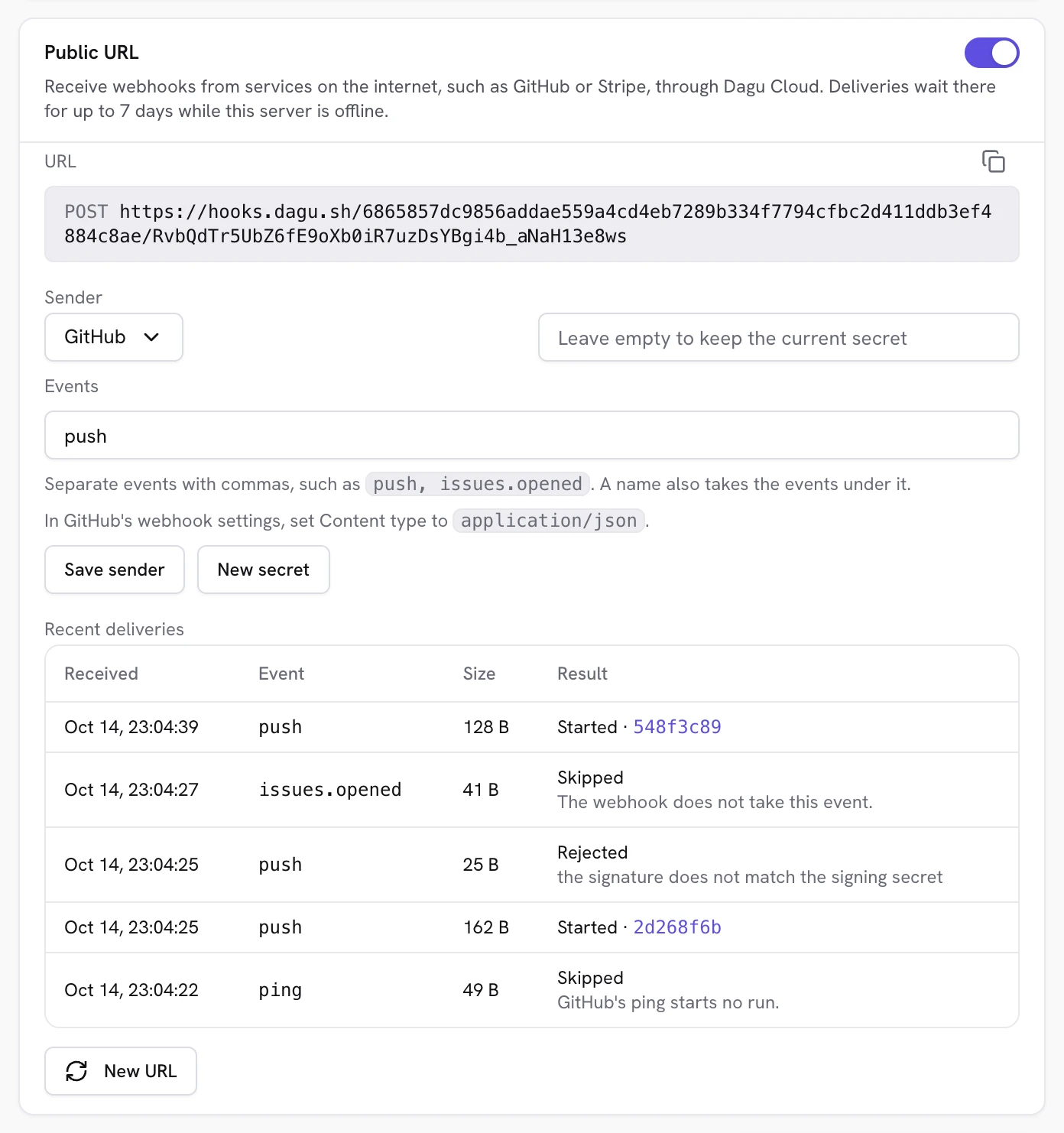
pushorpull_request.opened, and everything else is skipped. - Every delivery accounted for. The card shows the latest deliveries, how each was handled, and a link to the run it started.
Set it up for GitHub
- Update the server to Dagu v2.20 or later, and connect it to Dagu Console from Plan & features. One server per workspace can connect for free.
- Open the DAG, then its Webhook tab, and create the webhook if it has none.
- In Public URL, turn the switch on. The URL appears within a few seconds.
- Choose GitHub as the sender, enter
pushunder Events, and select Save sender. Dagu makes a signing secret and shows it once. - In the repository's Settings › Webhooks on GitHub, paste the URL as the Payload URL, set Content type to
application/json, and paste the secret.
GitHub sends a ping when you save. It shows up on the card as skipped, since a ping never starts a run. Push a commit, and the next row says Started, with a link to the run.
What the run receives
The run gets the request in three variables:
WEBHOOK_PAYLOAD, the body exactly as the sender sent it;WEBHOOK_PAYLOAD_FILE, the path of a private file holding the same body, removed when the run ends;WEBHOOK_HEADERS, the request headers you list underwebhook.forward_headers.
Read the file when bodies may be large. One environment variable holds less than 128 KiB on Linux and macOS, so a larger body reaches the steps only as the file.
webhook:
  forward_headers:
    - X-GitHub-Event

steps:
  - id: deploy
    run: |
      branch=$(jq -r '.ref' "$WEBHOOK_PAYLOAD_FILE")
      ./scripts/deploy.sh "$branch"
Limits
| Free monitoring | Trial, Team, or Pro | |
|---|---|---|
| Public URLs per server | 1 | 1,000 |
| Request body | 512 KiB | 512 KiB |
| Requests per URL | 60 a minute | 60 a minute |
| Requests waiting per server | 1,000 | 1,000 |
A sender over a limit gets a clear status code, such as 429 with Retry-After, rather than a silent drop.
What Dagu Cloud sees
The point of running Dagu on your own server is that your workflows stay there, so it matters what passes through Dagu Cloud on the way:
- The request, briefly. Dagu Cloud stores each request's body and headers only until your server takes it, and for no more than 7 days. It strips credentials and proxy headers, such as
AuthorizationandCookie, before passing it on. - Not the token. The URL ends in a random token. Dagu Cloud stores only its SHA-256.
- Not the secret. Signatures are checked on your server, with a secret Dagu Cloud never receives.
- Almost nothing from your server. It sends its name, its Dagu version, and how each delivery was handled. Workflows, logs, and outputs never leave it.
Turning the URL off drops it within about 10 seconds, along with anything waiting for it.
Try it
Update a server to v2.20, connect it, and point one GitHub repository at it. The public webhook URL docs cover every sender, the events each one sends, and what senders see when something goes wrong. If you have questions or ideas, tell me on Discord.
Written by
Contributor to the Dagu project.
More from Yota Hamada